From Plain English to Insight: How AI Is Reshaping Data Visualization

From Plain English to Insight: How AI Is Reshaping Data Visualization
Most business data never gets looked at. It sits in databases, warehouses, and spreadsheets, waiting for someone with the right query skills and the right dashboard to surface it. For years, the gap between having data and understanding it has been one of the quietest but most expensive problems in business. AI-powered data visualization is closing that gap — turning a typed question into a chart in seconds.
This article explains how natural-language data intelligence actually works, where it delivers value, and what to watch for before you trust it with decisions. We will keep the technology grounded first, then show how the Apivom Pivot approach fits in.
The Real Bottleneck Was Never the Data
Organizations are not short on data. According to industry surveys, the volume of enterprise data has been roughly doubling every two years, yet most teams report using only a fraction of it for decisions. The constraint is rarely storage or collection — it is translation.
To answer a simple question like "Which regions slipped on renewals last quarter?", a non-technical manager traditionally needs three things:
- Someone who knows the data model and can write SQL or a BI query.
- A dashboard that happens to already contain that exact cut of the data.
- Time — usually a day or more in a request queue.
When any of those is missing, the question goes unanswered or gets replaced by a gut feeling. Multiply that across hundreds of small decisions a week, and the cost of the translation gap becomes enormous. This is the gap that natural-language analytics targets directly.
How Natural-Language Data Intelligence Works
The phrase "ask your data a question" sounds like marketing, but underneath it is a concrete, multi-stage pipeline. Understanding the stages helps you judge where these systems are reliable and where they are not.

Stage 1: Understanding Intent
The system first parses the question to figure out what is being asked — the metric (renewals), the dimension (region), the filter (last quarter), and the desired comparison. Modern systems use a large language model here, but the good ones constrain it heavily with schema context so it does not hallucinate columns that do not exist.
Stage 2: Generating the Query
Next, the intent is translated into an actual database query — usually SQL. This is the step that historically required a human analyst. A well-built system grounds the model in the real table and column names, relationships, and data types so the generated query is both valid and safe to run.
Stage 3: Choosing the Visualization
Raw query results are just rows. A trend over time wants a line chart; a part-to-whole breakdown wants a bar or donut; a geographic cut wants a map. Mature systems pick the chart type from the shape of the result, not from a guess, so the output is readable without manual formatting.
Stage 4: Explaining the Result
The final, often-overlooked stage is narration: a short, plain-language summary of what the chart shows — the outlier, the trend, the 80/20 split. This is what turns a visualization into an actual insight a busy executive can act on.
Where It Delivers — and Where It Doesn't
Natural-language analytics is not magic, and treating it as such is the fastest way to lose trust in it. It shines in specific situations and struggles in others.
It works well for:
- Exploratory questions — "Show me churn risk by product line" — where speed matters more than perfect precision.
- Self-service for non-analysts — letting a sales lead or finance manager answer their own questions without a ticket.
- First-pass discovery — surfacing anomalies, trends, and segments worth a deeper look.
It struggles with:
- Ambiguous business terms — if "active customer" means three different things across departments, the system needs a defined metric layer, not a guess.
- Highly governed reporting — regulatory or financial figures still demand audited, version-controlled queries.
- Deeply nested logic — multi-step calculations with edge cases still benefit from a human analyst's review.
The practical takeaway: use AI visualization to accelerate the path to a question's answer, and keep a human in the loop wherever the answer drives a regulated or high-stakes decision.
Guardrails Matter More Than Models
The single biggest difference between a toy demo and a production-grade system is guardrails. A model that can write any SQL can also write a slow, expensive, or unsafe query. Production systems wrap the generation step in protections:

- Read-only access so a question can never modify data.
- Schema grounding so the model only references real, permitted tables.
- Tenant isolation so one customer's question never touches another's data.
- Query validation and limits so a runaway query cannot overload the database.
If you are evaluating any natural-language analytics tool, these guardrails should be the first thing you ask about — long before chart aesthetics. A strong API gateway layer is often where these protections are enforced consistently across services.
The Apivom Pivot Approach
This is where Apivom Pivot addresses the gap. Pivot is built as a natural-language data intelligence layer that follows exactly the four-stage pipeline above — intent, query, visualization, explanation — but wraps each stage in production guardrails by default.
A question typed in plain language is routed through a multi-agent pipeline: one stage interprets intent, another grounds and generates the SQL against the real schema, a third selects the appropriate ECharts visualization from the result shape, and a final stage writes a short narrative summary. Every query runs read-only and tenant-isolated, so the same question is safe whether it comes from a sales manager or a finance lead.
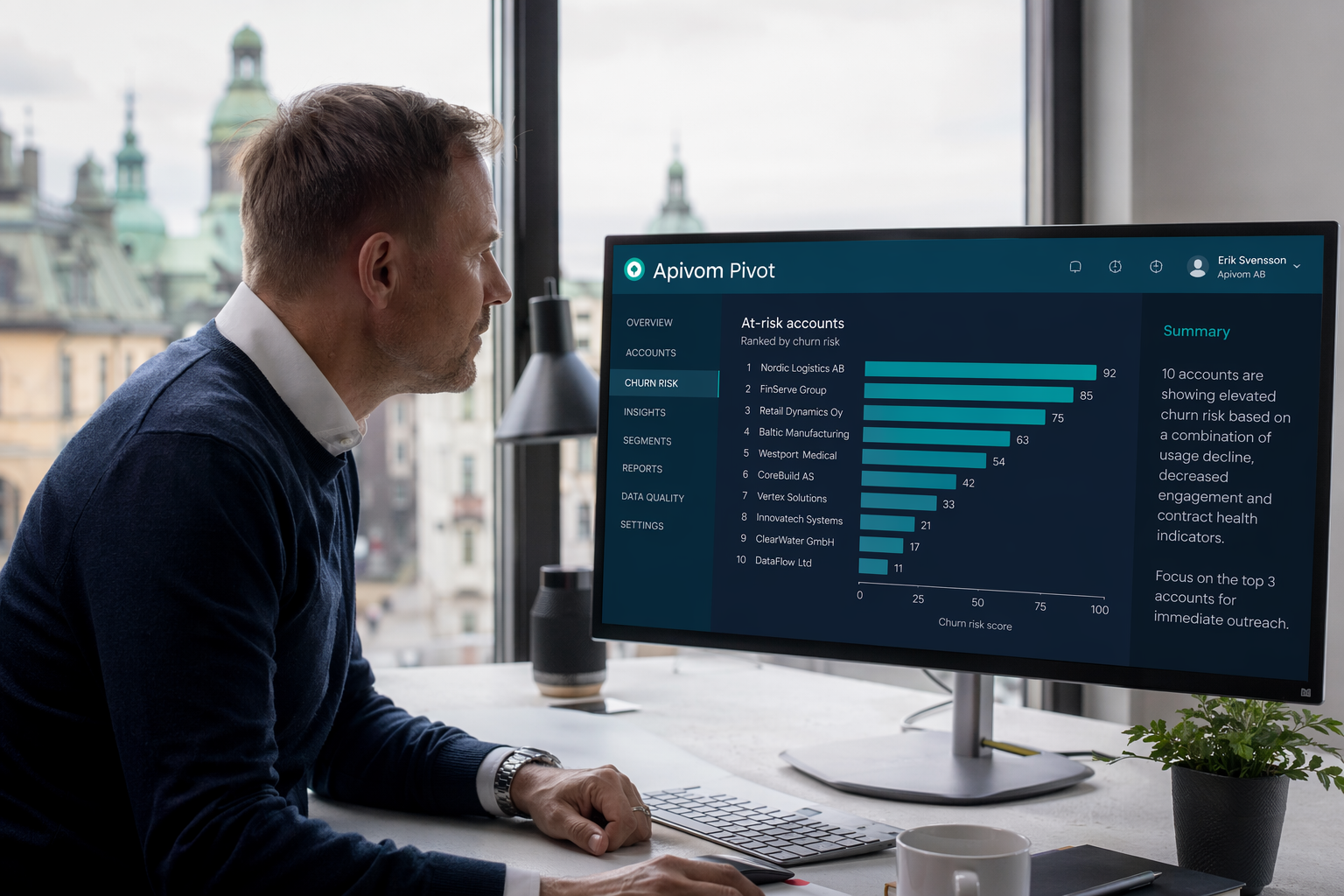
Because Pivot connects to live operational data through the same gateway that powers the rest of the platform — including Apivom Iris for customer and revenue data — the answers reflect the current state of the business, not a stale nightly export. The result is that someone without SQL skills can ask "Which accounts are most at risk of churning this quarter?" and get a ranked chart with a one-paragraph explanation, in seconds.
What This Means in Practice
The shift from dashboard-building to question-asking changes who gets to use data. When a manager can answer a follow-up question in ten seconds instead of filing a request and waiting a day, the entire rhythm of decision-making speeds up.
The measurable outcomes are concrete: analyst time is freed from ad-hoc query requests and redirected to deeper work, the time from question to answer drops from days to seconds, and decisions that used to rely on intuition start relying on the actual numbers. AI-powered visualization does not replace analysts — it removes the queue in front of them and gives everyone else a faster path to the data they already own.